
Find gaming teammates who are ready to play now.
Gaming Pulse helps friends and gaming communities coordinate without repeatedly messaging everyone to ask who is online. Set a temporary gaming intent and connect when someone in your NIQVO circle is ready for the same game at the same time.
A different kind of gaming teammate finder
Traditional looking-for-group tools often focus on finding random players. NIQVO Gaming Pulse is built around timing between friends and community members. It is useful when you already have people you could play with, but do not know who is actually available right now.
Instead of sending “anyone online?” across multiple chats, set a Gaming Pulse. If another compatible player is ready during the same period, NIQVO can create a Coincidence so both people know the timing matches.
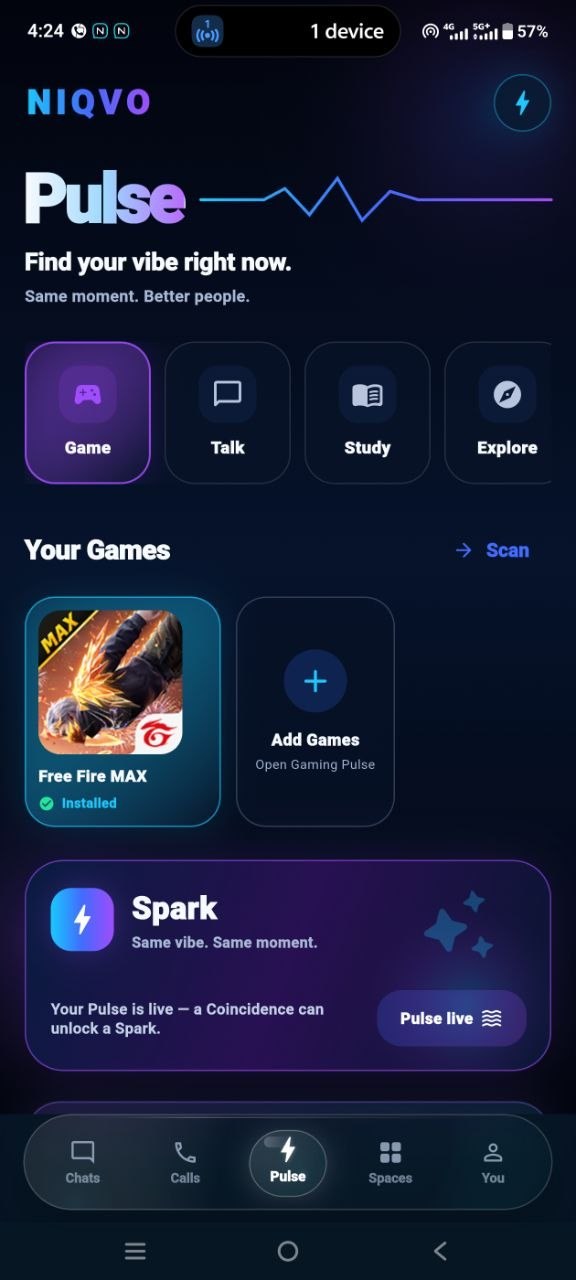
How Gaming Pulse works
- Choose Gaming. Start a temporary Gaming Pulse when you actually want to play.
- Select a supported game. Available choices can depend on the games and apps supported on your device.
- Set your Pulse. Your intent is temporary rather than a permanent public status.
- Get a Coincidence. When compatible timing matches with another player, NIQVO can reveal the match.
- Start a Spark. Continue into conversation, coordination or a supported game flow.
Supported games and launch behaviour can vary by device, platform and installed apps.
Find teammates for BGMI and Free Fire MAX
Gaming Pulse can help communities coordinate popular multiplayer games where timing matters. NIQVO has dedicated guides explaining the flow for players looking for teammates for specific games.
Built for friends, squads and gaming communities
A community may have dozens or hundreds of members but only a few people ready to play at a particular moment. Gaming Pulse is designed to reduce that coordination gap.
Friends can use it when they want a duo or squad partner. Gaming communities can use it to encourage members to signal availability instead of filling announcement channels with repeated matchmaking messages. Organizers can also use NIQVO Spaces alongside Pulse for community coordination.
The important difference is that Pulse represents what someone wants to do right now. When the moment ends, the temporary intent does not need to behave like another permanent profile field or public feed.
Why timing matters when finding a gaming squad
Having gaming friends does not automatically mean having teammates available when you want to start a match. One player may be studying, another may already be in a squad, and someone else may only become available later.
Gaming Pulse makes availability part of the matching signal. That means the useful question is not only “who plays this game?” but also “who wants to play this game at the same time as me?”
Gaming Pulse FAQ
Can NIQVO help me find a BGMI teammate?
Gaming Pulse can help you connect with compatible friends or community members who are ready to play at the same time. Read the BGMI teammate finder guide for the game-specific flow.
Can I use NIQVO to find Free Fire MAX teammates?
Yes, when the game is supported for your device and community flow. See the Free Fire MAX teammate finder guide.
Does Gaming Pulse match me with random strangers?
NIQVO Pulse is primarily designed around compatible friends and community connections rather than acting as an unrestricted anonymous matchmaking service.
What happens after a teammate match?
A matching Pulse can create a Coincidence. From there, players can start a Spark and coordinate what to do next.